
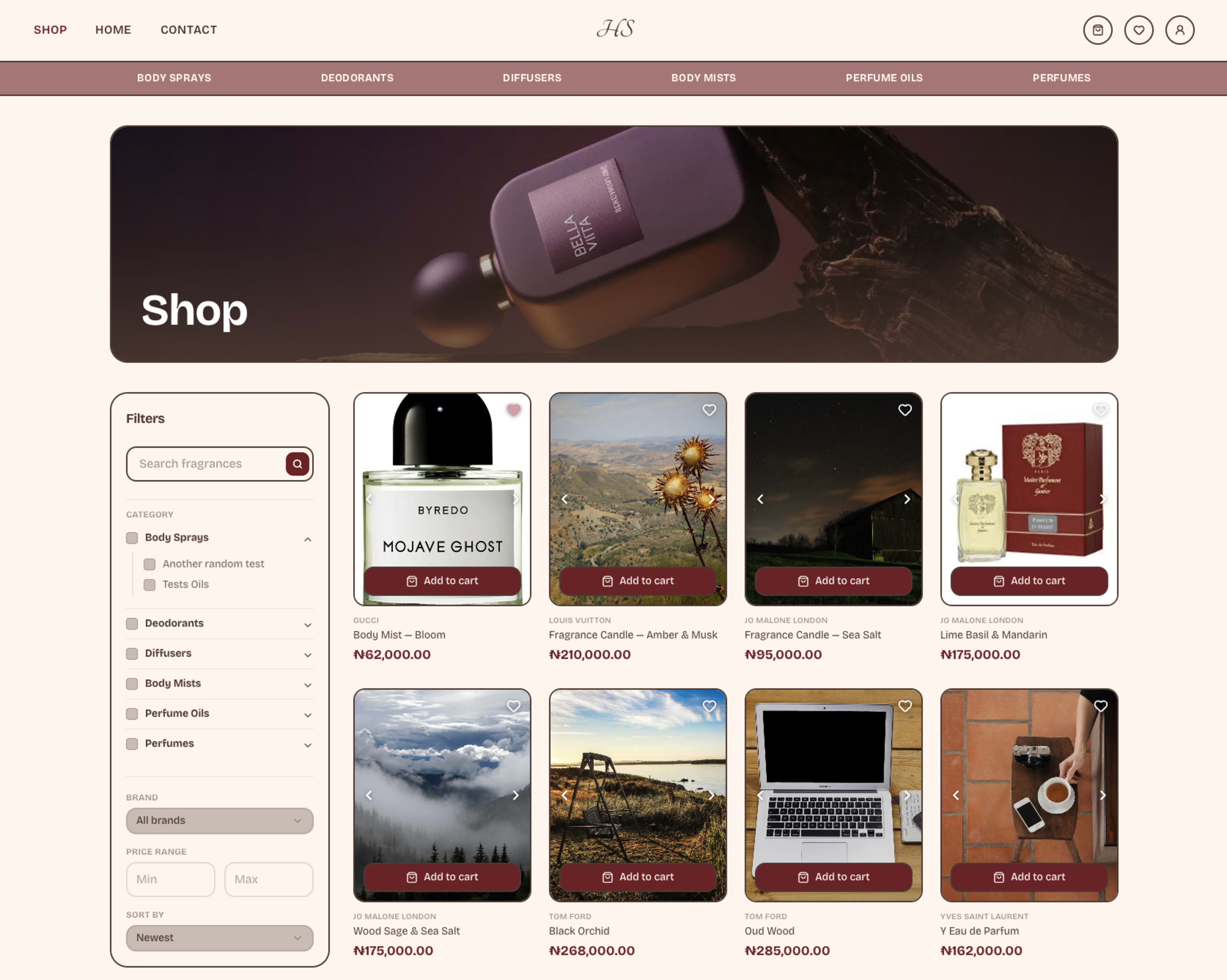
Honeyyscent consists of two applications that share the same codebase and database: the storefront and admin panel. The platform was designed to support the business end to end, from managing the product catalogue and storefront content to handling orders, payments, delivery, and fulfillment.
The storefront gives customers a straightforward way to discover and purchase fragrances, with product search, filtering, wishlists, discounts, and checkout built into the experience. The admin panel provides the business with the tools to manage the catalogue, configure store settings, update storefront content, and process orders without requiring code changes for routine operations.
Technical Foundation
The application is built with Next.js 16, using the App Router and Turbopack, with React 19 and TypeScript throughout. Data is stored in PostgreSQL hosted on Supabase and accessed through Prisma. The shared data model provides a consistent representation of entities such as products, orders, customers, and discounts across the application.
The interface uses Tailwind CSS v4 and shadcn/ui as its component foundation. Forms use React Hook Form with Zod for validation, with the same schemas enforcing data requirements on both the server and client. Administrative tables use TanStack Table for sorting, filtering, and pagination. Product carousels use Embla Carousel, while product descriptions are managed through Tiptap, allowing administrators to format content without writing HTML.
Authentication and payments
The application uses separate authentication systems for administrators and customers. Administrative accounts use role based access control with session validation at the routing layer. Customer accounts use email and password authentication with email verification through a one time code.
Payments are processed through Bachs, a Nigerian payment processor. Its overlay SDK allows customers to complete payment without leaving the storefront. A payment is only considered successful after the server receives and verifies the payment provider's signed webhook. Manual bank transfer is supported as an alternative payment method.
Customer experience
Browsing
The homepage contains an administrator controlled hero carousel, a popular products section based on sales data, category tiles, and new arrivals. The product catalogue supports filtering by category, subcategory, brand, and price range. Product search is performed server side without requiring a full page reload.
Wishlists
Customers can save products without creating an account. Guest wishlists are associated with the customer's browser through a private edit token. If a guest later creates an account, the existing wishlist can be merged into the new account. Wishlists can also be shared through a link. Anyone with the link can view the wishlist, while only its owner can modify it.
Cart
The cart persists locally on the customer's device. Syncing the cart to the customer's account was not a major concern at this stage. Inventory is checked against current stock during checkout. If a product becomes unavailable after being added to the cart, it is identified and excluded from the order rather than allowing the customer to purchase unavailable stock.
Delivery and payment options are configurable through the admin panel, allowing the business to introduce new options without modifying the application. Discounts are calculated at the time of purchase and stored with the order. Changes to a product's price or an expired discount therefore do not affect previously placed orders.
Store operations
The admin panel provides full management of the store's catalogue and operations. Products can have multiple size and price variants, scent notes, brands, and concentrations. Administrators can manage categories, subcategories, discounts, delivery options, payment options, and homepage content.
The dashboard provides an overview of pending orders, recent activity, and revenue, allowing the business to monitor important information without navigating through individual records.
SEO
SEO was considered as part of the storefront architecture rather than added after development. Search relevant pages are server rendered with appropriate page specific metadata, allowing search engines to access meaningful content without depending on client side rendering.
The sitemap is generated automatically so that new and updated pages are included without maintaining a static sitemap manually. For content that changes infrequently, Incremental Static Regeneration (ISR) is used where appropriate. This allows those pages to benefit from static generation while still being revalidated when their underlying content changes.
Together, server rendering, page specific metadata, automatic sitemap generation, and ISR provide a search friendly architecture while keeping content reasonably fresh.
Design system
The visual design went through several iterations during development. The initial direction used a strong neo brutalist style with thick borders, offset shadows, uppercase headings, and rotated elements. While this established a distinct visual identity, it competed with the product photography and did not align as well with the premium positioning of the fragrance brand.
The final direction combines neo brutalist elements with a more minimal interface. Borders are used selectively as visual accents, headings use uppercase styling primarily for labels, and shadows are implemented through CSS rather than additional elements.
Typography
The primary typeface is Bricolage Grotesque, selected for its warmth and character while maintaining readability. The logo uses My Soul, a separate script typeface restricted to the wordmark rather than being used throughout the interface.
Colour system
The final palette uses cream backgrounds, burgundy for primary actions and price elements, blush pink for accents and interaction states, and espresso brown for body text. The colours are implemented through a small set of design tokens rather than being defined independently across components. This makes global changes to the visual identity possible without modifying individual components.
The palette change also required a contrast review across the interface. Buttons, badges, form states, and other interactive elements were checked to ensure that the new colours did not introduce readability or accessibility issues.
Visual details
A hand drawn flower motif appears throughout the interface as a recurring decorative element and as a mask for product photography in category sections. Product cards share a common component across the storefront, cart, and wishlist, keeping their appearance and behaviour consistent wherever a product is displayed.
Engineering considerations
The main engineering challenges came from maintaining consistent state and data integrity across the purchasing flow. Stock updates are handled atomically in the database, preventing two simultaneous purchases from both successfully claiming the same final unit of inventory.
The client side payment flow can display a successful checkout state, but an order is only treated as paid after the server receives and verifies the payment provider's signed webhook. The cart stores the product identifier and quantity rather than relying on potentially outdated product information. Current price, stock, and discount information are retrieved when the order is processed.
Order data is stored as a snapshot so that subsequent changes to products, prices, discounts, or delivery fees do not modify existing orders.
Current state
The storefront and admin panel are functional end to end. Customers can browse products, manage wishlists and carts, and complete orders. Administrators can manage the catalogue, configure store settings, process orders, and manage the fulfillment workflow without modifying the codebase.
The platform is still being refined. Customer account functionality, including order history and saved addresses, is being expanded, while some pages are undergoing further visual refinement. The core architecture, data model, administration system, SEO implementation, and payment flow are in place and operational.